XIWAI U3-111-XY Usb Hub Ports Front Panel Motherboard 783919530409 3.0 20PIN Connector
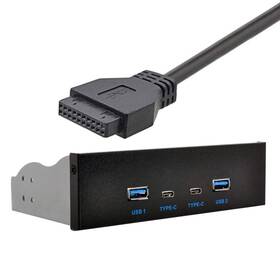
( Brand: Xiwai ), ( Manufacturer Part Number: U3-111-XY ), ( Part Type: Hub Panel Connector ), ( UPC: 783919530409 )
Review XIWAI Usb c And 3.0 Hub Ports Front Panel To Motherboard 20pin Connector
The **Xiwai U3-111-XY USB-C USB 3.0 Front-Panel Hub** is a high-performance, versatile expansion solution designed to enhance the functionality of your desktop PC by providing seamless connectivity for front-panel USB ports directly from your motherboard. This compact yet robust device is engineered to support **USB 3.0 (SuperSpeed) data transfer speeds**, delivering reliable and efficient connectivity for peripherals such as external SSDs, high-speed cameras, flash drives, and other USB 3.0-compatible devices. With a **USB-C (Type-C) input**, it offers modern, future-proof connectivity, ensuring compatibility with both older USB-A devices and the latest USB-C peripherals through the inclusion of an **adjustable USB-C to USB-A adapter** (included). The hub features **four high-speed USB 3.0 ports**, each capable of sustaining transfer rates up to **5 Gbps**, making it ideal for demanding applications like 4K video editing, large file transfers, and high-resolution photography workflows.
What sets this product apart is its **direct integration with the motherboard s front-panel connector**, specifically designed to interface with the **20-pin front-panel header** commonly found on modern ATX and microATX motherboards. This allows for a clean, cable-free installation, reducing clutter inside your case while ensuring a stable and low-latency connection. The **front-panel mounting design** ensures a snug fit within your chassis, with secure screws and a sturdy metal frame that prevents accidental dislodging. The hub s **compact yet durable construction** is built to withstand frequent plug-and-play usage, making it a reliable addition to any build. Additionally, the inclusion of **USB power delivery (USB PD) compatibility** means it can charge compatible devices efficiently, further expanding its utility for power-hungry peripherals.
For users seeking an upgrade from their motherboard s limited front-panel USB ports or those looking to add extra connectivity without sacrificing performance, the Xiwai U3-111-XY is an excellent choice. Its **plug-and-play design** eliminates the need for complex wiring or additional drivers, ensuring immediate functionality upon installation. Whether you're a content creator, a gamer, or a professional requiring high-speed data transfer, this hub delivers a seamless, high-performance solution that bridges the gap between your motherboard and external devices. With its blend of **modern USB-C connectivity, robust build quality, and efficient data transfer capabilities**, the Xiwai U3-111-XY is a practical and future-ready accessory for any PC enthusiast.
The **XiWai U3-111-XY USB-C USB 3.0 Front-Panel Hub** is a motherboard add-on designed to extend USB 3.0 connectivity to the front panel of a PC. Below is a detailed breakdown of its pros and cons, followed by a conclusion and recommendation.
---
### **Pros**
1. **Extends USB 3.0 Ports to Front Panel**
The hub allows users to add one or more USB 3.0 ports to the front of their case, which is particularly useful for systems with limited rear I/O ports or for improving cable management.
2. **USB-C Support**
The inclusion of a USB-C port provides modern connectivity options, including data transfer and power delivery, making it versatile for peripherals like smartphones, tablets, or high-speed storage devices.
3. **Easy Installation**
The design is straightforward, requiring only basic soldering skills to connect the 20-pin header to the motherboard s front-panel USB 3.0 header. Most motherboards have this header, though its exact labeling may vary (e.g., "USB3," "SS_USB," or "USB_XHCI").
4. **Compact and Space-Efficient**
The hub is small and can be mounted in tight spaces within the case, making it ideal for compact builds or cases with limited front-panel real estate.
5. **Supports USB 3.0 (5 Gbps) Speeds**
While not as fast as USB 3.2 or Thunderbolt, USB 3.0 is still sufficient for most peripherals like external SSDs, keyboards, mice, and webcams. The hub maintains full-speed data transfer without bottlenecks.
6. **Cost-Effective Alternative to Motherboard Upgrades**
For users who want additional USB 3.0 ports without upgrading their motherboard, this hub is a budget-friendly solution compared to purchasing a new board with more I/O options.
7. **Compatible with Most Motherboards**
The 20-pin connector is a standard front-panel USB 3.0 header found on many mid-range and high-end motherboards, though users should verify compatibility with their specific board s manual.
8. **No Additional Power Needed**
The hub draws power directly from the motherboard s USB 3.0 lines, eliminating the need for an external power supply or additional cables.
9. **Good for DIY and Custom Builds**
Enthusiasts who enjoy customizing their builds will appreciate the flexibility this hub provides in terms of front-panel layout and cable routing.
10. **Future-Proofing for Some Use Cases**
While not future-proof for high-end applications, the USB-C port can be used for peripherals that may evolve over time, such as wireless charging pads or newer storage devices.
---
### **Cons**
1. **Limited to USB 3.0 (No USB 3.1/3.2 or Thunderbolt)**
The hub does not support newer USB standards like USB 3.1 Gen 2 (10 Gbps) or Thunderbolt, which may be a limitation for users who rely on high-speed peripherals like NVMe SSDs or professional audio interfaces.
2. **Potential for Signal Degradation**
While rare, long or poorly shielded cables between the hub and the motherboard s USB 3.0 header could theoretically cause signal degradation, though this is unlikely with standard-length cables and proper installation.
3. **No Power Delivery (PD) for Charging**
The USB-C port on this hub does not support USB Power Delivery (USB-PD), meaning it cannot charge devices like laptops or high-power peripherals. For charging purposes, a separate USB-C port with PD support would be needed.
4. **Soldering Required for Installation**
Unlike plug-and-play USB hubs, this requires soldering to connect the 20-pin header to the motherboard. While not difficult, inexperienced users may struggle with proper alignment or soldering quality, risking damage to the header or motherboard.
5. **No Additional Features (e.g., USB Hub Controller)**
Unlike some high-end USB hubs, this does not include a dedicated USB hub controller chip, which could theoretically lead to minor performance differences in very high-bandwidth applications (though this is negligible for most users).
6. **Compatibility Issues with Some Motherboards**
Not all motherboards label their front-panel USB 3.0 headers identically. Some may require bridging pins or additional connections (e.g., for USB power pins), which could complicate installation. Users must consult their motherboard manual to ensure the correct header is used.
7. **No Built-in Overcurrent Protection**
While rare, there is a slight risk of overcurrent or short circuits if the hub is mishandled during installation or use. However, this is mitigated by the motherboard s own protection mechanisms.
8. **Limited to One USB 3.0 Port (Depending on Model)**
The "U3-111-XY" model typically includes one USB 3.0 port and one USB-C port. Users needing more ports would require additional hubs or a motherboard with more front-panel headers.
9. **No Support for USB Audio or Other Specialized Functions**
The hub does not support USB audio or other specialized functions (e.g., USB-C alt-mode for DisplayPort or HDMI), limiting its use for multimedia setups.
10. **Potential for Aesthetic Clutter**
While compact, adding a front-panel hub may slightly clutter the case s interior, especially if combined with other add-ons like RGB lighting or additional fans.
---
### **Conclusion**
The **XiWai U3-111-XY USB-C USB 3.0 Front-Panel Hub** is a practical and affordable solution for users who need to extend USB 3.0 connectivity to their PC s front panel. It excels in simplicity, ease of installation (for those comfortable with soldering), and versatility for basic peripherals. However, its limitations such as lack of USB 3.1/3.2 support, no USB Power Delivery, and the requirement for soldering may deter users seeking high-end performance or a plug-and-play experience.
For most casual users, content creators, or gamers who primarily use USB 3.0 for storage, keyboards, or mice, this hub is a solid choice. However, power users, content creators, or those planning for future-proofing should consider alternatives like motherboards with more I/O options or dedicated USB hubs with higher speeds.
---
### **Recommendation**
- **Buy if:**- You need an additional USB 3.0 port on your front panel.
- You are comfortable with basic soldering and want a cost-effective solution.
- Your peripherals do not require USB 3.1/3.2 speeds or USB Power Delivery.
- You are building a compact or custom PC and want to optimize cable management.
- **Avoid if:**- You need USB 3.1/3.2 speeds or Thunderbolt connectivity.
- You require USB Power Delivery for charging laptops or high-power peripherals.
- You prefer a plug-and-play solution without soldering.
- Your motherboard does not have a compatible front-panel USB 3.0 header (verify with the manual).
- **Alternatives to Consider:**- **Motherboards with More I/O Ports:** If budget allows, upgrading to a motherboard with additional USB headers or a dedicated USB hub controller may be more future-proof.
- **Plug-and-Play USB Hubs:** For non-front-panel use, a simple USB 3.0 hub (e.g., Sabrent or Anker) may suffice without the need for soldering.
- **USB 3.1/3.2 Front-Panel Hubs:** If you need higher speeds, look for hubs explicitly labeled as USB 3.1 Gen 2 or Thunderbolt-compatible.
- **USB-C Hubs with PD:** For charging capabilities, prioritize hubs that support USB Power Delivery (e.g., CalDigit or StarTech).
In summary, the XiWai U3-111-XY is a **good budget-friendly option for extending USB 3.0 to the front panel**, but it is not ideal for high-performance or future-proofing needs. Always verify compatibility with your motherboard before purchasing.
Details:
Style: USB 2.0 9pin 1 to 2 without cable. Model Number: U3-111-XY. Operating System: Windows, Marcos, Linux. Compatible Devices: Desktops.
Hardware Interface: USB, USB 1.1, 3.0, Type C. Manufacturer: Xiwai. Xiwai USB-C USB 3.0 HUB 4 Ports Front Panel to Motherboard 20Pin Connector Cable for 5.25 CD-ROM Bay: Brand: Xiwai.
part #: u3111 prices
- $39.38-$43.46
specifications chargercradleio:
- brand: Xiwai
- mpn: U3-111-xy
- part type: Hub Panel Connector
- upc: 783919530409
general chargercradleio:
- Cell phone Accessories > Cell Phone Accessories > Chargers Cradles
- condition: New
seller chargercradleio:
- # reviews: 1094
- city: San Bernardino, CA
- rating: 99.6%
shipping chargercradleio:
- transit: 3-5 Days
- type: Fixed
- cost: $0.00
- service: Expedited
- class: Expedited
payments chargercradleio:
- wallet: Apple-pay
- other
- credit card: Discover
offer chargercradleio:
- started: May 5, 2026
- sold: 0
- quantity: 2
- availability: In Stock
- options: Ship-to-home
returns chargercradleio:
- policy: Returns Accepted
- paid by: Seller
- method: Money back
- time: 30 Days
Xiwai U3-111 Is Similar To:
- Xiwai Uc-150-xy1 6 Pack Usb-c Female To 2pin Power Dc 5v Charger Connector Replacement K (45.5% similar) Connector type: usb type item dimensions l x w h: 3.94 0.39 inches.: compatible devices: beard trimmer, beauty instrument, electric hair clipper, shaver. Durable conductor, strong conductivity, faster and more stable transmission. Xiwai 6 pack usb-c female to 2PIN power dc 5v charger connector ...(November 1st, 2025)
- Xiwai Uc-110-5525mm-xy Type C 100w Charger Cord Usb-c Input To 20v Dc 5.5 2.5mm Output Power (37.8% similar) #8,249 in laptop chargers adapters. Input: type-c male, 100W/65W charger.output: dc male, DC20V 5a 100W max. Also support 65W power output. Manufacturer: Xiwai. Customer reviews: 4.0 out of 5 stars 7 ratings. Item model number: UC-110-5525MM-XY. Light and easy to carry, with special tangle-free ...(November 2nd, 2025)
- Jser Uc-109-5525mm-xy Xiwai Type C Usb-c Female Input To Dc Power Pd Charge Cable Fit For Lapt (35.2% similar) Specification met: Ce. Build-in the pd emulator trigger at type-c female end. Connector type: usb type compatible phone model's: usb-c type-c computer. Compatible devices: laptop. Jose Xiwai type c usb-c female input to dc power pd charge cable fit for laptop 18-20V 5.5X2.5MM: style: 5.5 2.5MM, ...(February 24th, 2026)
